



SOC 2 Readiness Assessment & Control Matrix (Excel)
SOC 2 Readiness Assessment & Control Matrix (Excel)
Regular price
$59.00 USD
Regular price
Sale price
$59.00 USD
Instant download. Editable files. One-organization licence. 5-day fit guarantee.
Couldn't load pickup availability
Upgrade and save
This is one of the 3 kits in the SOC 2 Starter Bundle: 20 policy templates, the readiness assessment and control matrix, and the risk assessment and vendor management kit. Get all 3 for $199 instead of $237 bought separately.
See the SOC 2 Starter Bundle (Policies, Control Matrix, Risk & Vendor)Want everything for the audit? The SOC 2 Compliance Toolkit has all 52 templates for $249.
Not ready to buy? Get the free SOC 2 readiness checklist
5-day fit guarantee. If it does not fit your SOC 2 program, ask for a refund within 5 days. Conditions.
Find your SOC 2 gaps, assign owners and track evidence before the auditor arrives. One Excel workbook with 148 controls written for a cloud-hosted SaaS company, mapped to all 61 Trust Services Criteria.
What you get
- Scope sheet (Excel): report type, categories, in-scope systems and subservice organizations such as your cloud host.
- Criteria sheet (Excel): all 61 criteria by ID with our own plain-English summaries, switching in or out with your chosen categories.
- Control Matrix (Excel): 148 controls across 18 domains, from governance and access control to privacy, each with the criteria it maps to, the related policy, owner, frequency, status, gap notes and target date.
- Readiness Dashboard (Excel): readiness by criteria series, with a flag for any in-scope series that has no control.
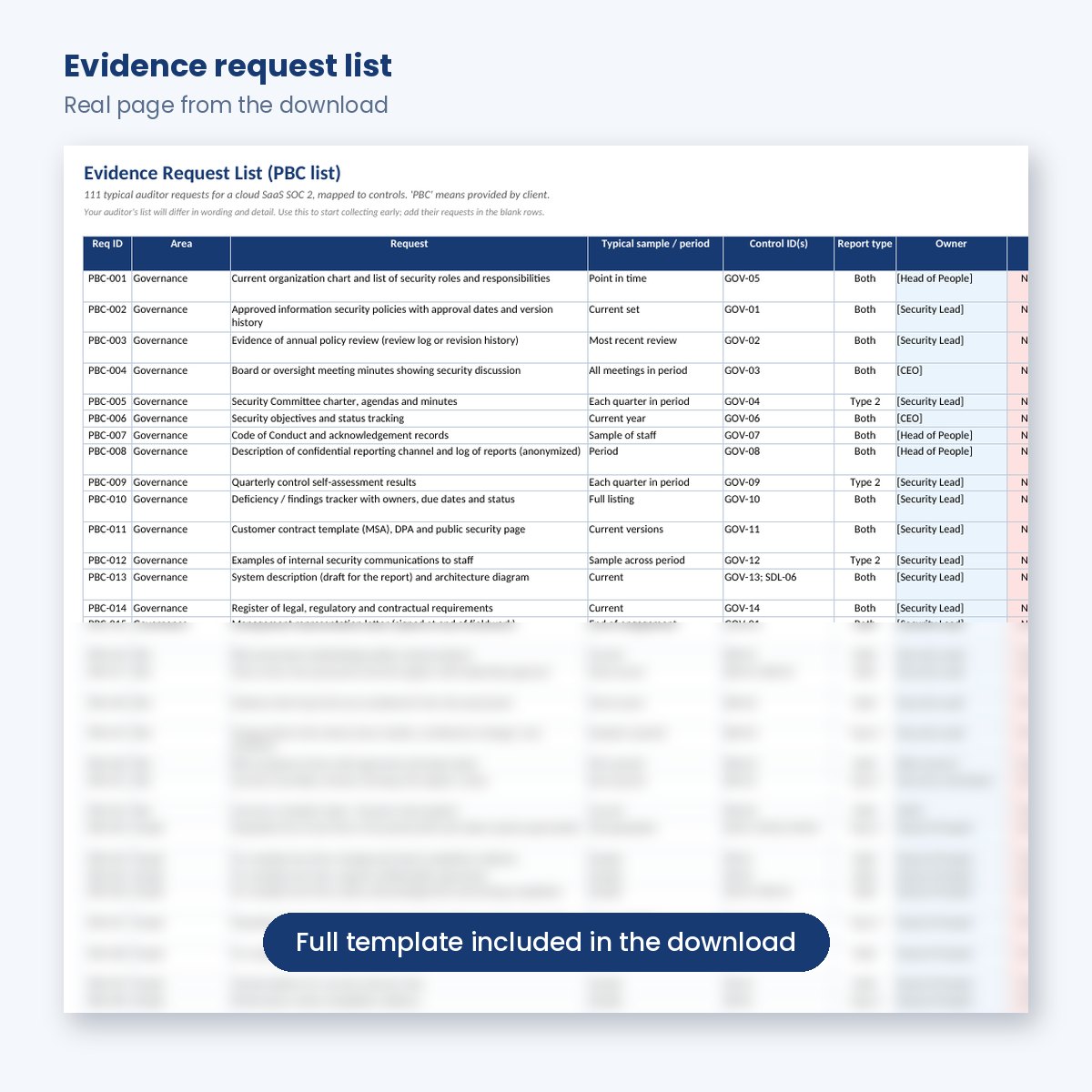
- Evidence Request List (Excel): 111 typical auditor requests (the PBC list), each linked to control IDs and marked for Type 1, Type 2 or both.
- Instructions sheet and Start Here guide (Excel and PDF): key terms in plain English and the order of work.
Also included in the SOC 2 Starter Bundle and the SOC 2 Compliance Toolkit.
How to use it
- Complete the Scope sheet: Type 1 or Type 2, categories, systems and vendors (30 to 60 minutes).
- Walk each control domain with its owner. Edit descriptions to match reality, set status honestly and mark N/A with a reason (1 to 2 days).
- Add target dates for everything not yet operating and feed the gaps into your project plan.
- Review the dashboard with leadership, then monthly.
- Assign owners to the evidence requests and start collecting now, even before you pick an auditor.
Who it is for
The person asked to "get us SOC 2": a founder, CTO, first security hire or operations lead at a SaaS company. No prior audit experience needed. If you already use a compliance platform, use it to check the platform's control set against your real operations.
Good to know
- Instant download. Editable Excel (.xlsx) plus a PDF guide. Works in Excel 2016 or later, Microsoft 365, Google Sheets and LibreOffice; no macros.
- Licensed for use within one organization.
- Criteria are referenced by number and summarized in our own words; the AICPA criteria are free to download from the AICPA.
- SOC 2 is an attestation report by a licensed CPA firm, not a certification. These templates help you prepare; they do not guarantee an unqualified SOC 2 opinion.
- 5-day fit guarantee: if it does not fit your system, contact us within 5 days of purchase.


What every download includes
Instant downloadLink on the confirmation page and by email within minutes.
Fully editableExcel (.xlsx) and PDF. No macros. Works in Microsoft 365 and Google Workspace.
5-day fit guaranteeIf the files do not fit your SOC 2 program, ask for a refund within 5 days. Conditions apply.
Free updatesRevised files for the current version of the Trust Services Criteria are sent to you at no charge. One-organization licence.
Templates refer to Trust Services Criteria numbers (for example CC6.1) and describe them in our own words; they do not reproduce AICPA text. A SOC 2 report is issued by a licensed CPA firm. Templates help you prepare; they do not guarantee a clean report.
Questions about SOC 2 Readiness Assessment & Control Matrix (Excel)
What is a SOC 2 control matrix?
It is the list of activities your company performs to meet each Trust Services Criterion, such as quarterly access reviews or peer-reviewed code changes, with an owner, frequency and status for each. Auditors test the controls you claim, so the matrix becomes the backbone of your audit. This one contains 148 controls mapped to all 61 criteria.
Should we keep all 148 controls?
No. Remove or mark N/A anything that does not fit your business, with a written reason. Auditors test what you claim, and extra controls add evidence work and potential exceptions. What matters is that every in-scope criterion has at least one real control, which the dashboard checks for you.
What is the Evidence Request List?
It is a list of 111 typical requests an auditor sends, often called the PBC (provided by client) list: things like access review records, change tickets and training completion. Each request links to control IDs and shows whether it applies to Type 1, Type 2 or both. Your auditor's list will differ in detail.
Does it work alongside a compliance platform?
Yes. Many teams use the matrix to check a platform's generic control set against how they really operate, adjust descriptions and frequencies, and plan evidence collection that the platform cannot automate. It is a plain Excel workbook with no macros, so it is easy to share with your team and your auditor.
How will I receive the files?
A download button appears on the order confirmation page and the same link is emailed to you within a few minutes. Bundles arrive as one ZIP file.
Can I get a refund?
Yes. With our 5-day fit guarantee, if the files do not fit your SOC 2 program you can ask for a full refund within 5 days of your order. It applies once per customer and organization, covers the whole product, and requires you to confirm you have deleted the files. We also refund non-delivery, defective files, wrong items and duplicate purchases within 30 days. Read the full refund policy.
Can I see the files before I buy?
Yes. The images above show real pages from the files, and the free SOC 2 readiness checklist lets you check where you stand before you buy.
Can I use the templates with more than one company?
Each purchase is licensed to one organization. Consultants and groups need one licence per client or legal entity. See the licence agreement.
Templates that work with this one
Useful next steps when you prepare for a SOC 2 audit.

